






Operating a pixelated pizzeria might start as a casual pastime, but as your restaurant expands, Pizza Ready transforms from a simple arcade idle game into a complex logistics simulation. In the early stages, players can get by simply rushing around the floor, throwing down cash, and personally carrying stacks of pizza boxes to waiting customers. However, once you unlock later branches and face overwhelming rushes at both the main counter and the drive-thru, your personal avatar becomes a bottleneck. Survival and maximum profitability depend entirely on a single, critical aspect: Late-Game Employee Management.
This comprehensive guide will walk you through the absolute optimization of your workforce. We will cover everything from hiring strategies and speed-to-capacity balancing to pathfinding management, training ROI (Return on Investment), and automated split-responsibility workflows. If your restaurant is struggling with long lines, idle workers, or lost revenue at the drive-thru, this deep-dive operational manual is designed to turn your chaotic kitchen into a fully automated, cash-generating machine.
1. Auditing the Workforce: Identifying Bottlenecks in Your Initial Pizzeria Setup
Before you can build an optimized workforce, you must first understand the fundamental limitations of your starting staff. In the opening stages of a new branch, players face severe cash constraints, meaning every dollar spent on hiring a new worker or increasing an existing worker's stats must yield immediate returns. The most common pitfall for developing players is hiring blindly without identifying where the actual service delay is occurring. Is the kitchen failing to produce pizzas fast enough, or are your front-of-house workers moving too slowly to clear the counter?
[Production: Ovens] ──> [Transit: Handlers] ──> [Point of Sale: Cashiers]
│ │
└── Check Speed └── Check Queue Length
To run a proper audit, you must stand still and observe your restaurant's natural workflow for exactly two minutes without intervening. Look at the three main zones: the oven output tiles, the main counter queuing lines, and the drive-thru window. If the oven tiles are consistently maxed out with stacks of fresh pizzas while customers walk away angry, your bottleneck is transit speed and staff capacity. Conversely, if your cashiers are standing idly at the registers while a mountain of raw dough sits untouched, your production line is broken.
Documenting these patterns allows you to allocate your limited upgrade capital with surgical precision rather than raw guesswork.
Understanding the Three Core Staff Metrics
Every worker you onboard operates under three core pillars that dictate their efficiency across the restaurant floor:
- Movement Speed: The velocity at which an employee travels between supply tiles (ovens, trash, or storage) and delivery points (counters, drive-thrus, or cleaning zones).
- Carrying Capacity: The maximum number of pizza boxes, raw ingredients, or trash items a staff member can stack vertically before they are forced to make a delivery trip.
- Task Assignment Priority: The hidden algorithmic weight that dictates whether a worker prioritizes serving a counter customer, clearing trash, or feeding the drive-thru lane.
The Financial Cost of Inefficient Staffing
When staff metrics are left unbalanced, your business bleeds cash in two specific ways: customer abandonment penalties and operational downtime. If a customer stands at the register or drive-thru window for too long without being served, a red timer appears over their head. Once this timer expires, they leave the premises completely, destroying the potential revenue of that transaction. Furthermore, an under-optimized worker who spends too much time walking back and forth with low capacity creates a ripple effect, forcing other high-performing stations to sit idle while waiting for logistical support.
2. The Mechanics of Movement: How Speed Upgrades Alter Late-Game Pathfinding
As you pour cash into the HR (Human Resources) computer to upgrade your staff's speed, the game's underlying pathfinding mechanics undergo a dramatic shift. At base levels, workers move at a sluggish pace, which ironically keeps their pathfinding calculations stable because they rarely collide or overlap. However, when you max out worker speed in the late-game phases, your staff moves with lightning velocity across the floor. This introduces a major hidden challenge: pathfinding congestion and clipping errors around tight architectural corners.
Understanding how speed impacts AI routing is essential for layout planning. Workers in Pizza Ready utilize a modified "greedy pathfinding" algorithm, meaning they calculate the shortest linear distance to their target objective at the exact moment their hands become empty or full. They do not actively plan around each other. When eight max-speed workers all target the same oven tile simultaneously, they form a dense cluster, effectively blocking one another and slowing down the overall transit loop.
Optimizing Kitchen Layout Geometry
To minimize pathfinding friction, you must intentionally engineer clear transit corridors within your kitchen and storefront layout.
Managing Corner Radii and Obstacles
Never place upgrades or non-essential decorative elements near the immediate corners of your oven arrays or counter stations. Workers tend to hug these corners tightly; if an obstacle is placed too close, their hitboxes can get momentarily stuck, resetting their movement animation and costing you vital seconds. Keep a clear, two-tile buffer zone around every major interaction point.
Creating Dedicated Logistics Runways
Ensure that the path between your main kitchen area and the front counter remains completely unobstructed by tables or trash cans. Think of this space as a high-speed highway. If sitting customers or discarded garbage piles infringe upon this lane, your high-speed workers will constantly recalculate their paths, causing erratic zig-zag movements that completely negate the speed upgrades you paid for.
[ Ovens ] ═══════════ (Two-Tile Buffer Zone) ═══════════ [ Main Counter ]
[ Clear Runway ]
The Synergy Between Player Speed and Employee Velocity
Your personal avatar's movement speed should always stay one step ahead of your employees' speed. In high-pressure scenarios, you function as the ultimate logistical circuit breaker. If you notice a sudden backup at the drive-thru because your staff is tied up at the front counter, your superior speed allows you to cross the restaurant instantly, clear the bottleneck, and restore normal operational flow before the AI pathfinding catches up.
3. Capacity Calibration: Finding the Mathematical Balance Between Stack Size and Speed
A common misconception among mid-game players is that maximizing carrying capacity as quickly as possible is always the superior strategy. This is a mathematical trap. If a worker’s carrying capacity is upgraded to hold 10 pizza boxes, but their movement speed is slow, they will spend an enormous amount of time standing by the oven waiting for 10 boxes to accumulate. While they wait, the front counter line grows longer, timers expire, and customers walk away.
Efficiency = (Carrying Capacity × Movement Speed) ÷ Transit Distance
The goal is to achieve an optimized equilibrium where a worker’s capacity perfectly matches the production cycle of your ovens. If an oven produces one pizza every two seconds, and you have four workers with a capacity of 10, it will take 20 seconds of pure standing time for a single worker to maximize their stack. This creates massive gaps in your customer service delivery loop. You must balance the upgrades incrementally to ensure that your staff is constantly in motion rather than hovering over supply zones.
Phase-Based Capacity Scaling
To help you scale your operations smoothly, use the following framework to balance capacity and speed across your restaurant's growth cycle:
The Hidden Penalty of Over-Stacking
When a worker carries a massive stack of pizzas that exceeds the immediate demand of the station they are serving, they become logistically locked. For example, if a staff member carries 12 pizzas to a counter that only needs three, they must then carry the remaining nine boxes to another station or return them to an open storage tile. This extra leg of travel wastes valuable time. Over-stacking creates an inefficient loop where workers spend more time managing their excess inventory than actually fulfilling active customer orders.
4. The Drive-Thru Dilemma: How to Automate Split-Responsibility Workflows
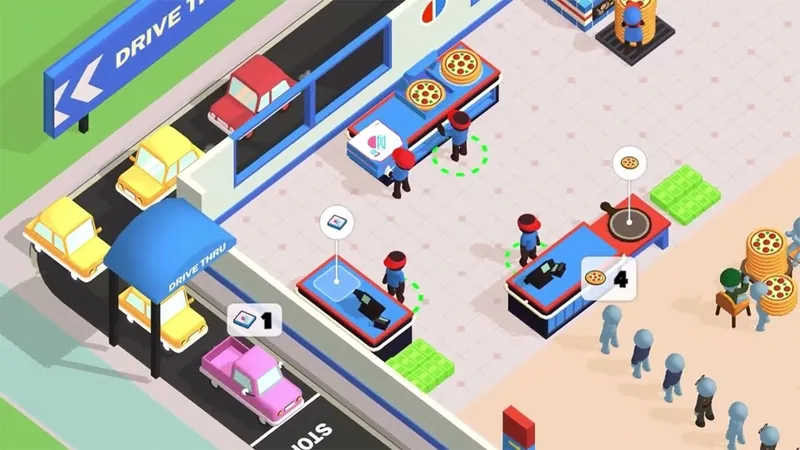
The moment you unlock the drive-thru window, Pizza Ready shifts from a single-front operation to a dual-front logistical challenge. The drive-thru is highly lucrative, but it features a drastically shorter customer patience timer compared to the standard indoor queue. If you do not explicitly structure your employee workflow to handle this split responsibility, your workers will naturally gravitate toward the closest service station—usually the front counter—leaving drive-thru vehicles waiting until they eventually drive away in anger.
┌──> Front Counter (High Volume, Long Timers)
[ Oven Output ] ──────┤
└──> Drive-Thru Window (Low Volume, High Priority, Short Timers)
To master the drive-thru dilemma, you must understand how the game's task allocation AI functions. Workers prioritize proximity above all else. If an oven sits directly behind the front counter, workers collecting pizzas will almost always deliver them straight to the counter registers because it is the shortest path calculated by their algorithm. To force automation and break this proximity loop, you must utilize spatial separation and custom hiring allocations to create distinct, isolated teams.
Step-by-Step Drive-Thru Automation Setup
Follow this step-by-step procedure to establish a fully automated, independent drive-thru supply line that operates flawlessly without requiring your personal intervention:
- Isolate the Closest Oven Array: Dedicate the oven cluster physically nearest to the drive-thru window exclusively for drive-thru production. Do not allow your front counter workers easy access to this zone.
- Over-Hire Beyond Counter Capacity: Increase your total staff count by at least two workers beyond what is required to keep the main indoor counter clear. These extra employees act as your dedicated floating logistics buffers.
- Establish a Multi-Tiered Stacking Zone: Upgrade the storage tile capacity immediately adjacent to the drive-thru window to its maximum level. This creates a buffer that holds surplus pizzas, protecting the window from sudden production drops.
- Manually Seed the Initial Drive-Thru Loop: When first establishing this system, personally carry three full stacks of pizzas to the drive-thru storage tiles. This anchors the local AI workers to this side of the building, keeping them focused on the nearby tasks.
- Anchor Cashiers Permanently: Max out the upgrade level of the specific cashier assigned to the drive-thru window. A high-level cashier processes payments instantly, ensuring that cars clear the lane rapidly and make room for the next order.
Tracking Drive-Thru Throughput Metrics
Keep a close eye on the vehicle exhaust animations at the drive-thru window to gauge your efficiency. If a car pulls up, idling for less than three seconds before driving away with a green cash icon, your split-responsibility system is perfectly balanced. If you see smoke clouds lingering for more than seven seconds, it means your floor staff is neglecting the window to serve walk-in customers. This is your cue to immediately upgrade the speed of your drive-thru-adjacent handlers.
5. Maximizing Cashier ROI: Upgrading Registers vs. Floor Staff Priorities
In the financial ecosystem of Pizza Ready, cashiers are your primary revenue collectors. You can have the fastest kitchen and the most efficient delivery handlers in the world, but if your cashiers are low-level and slow, your entire cash flow grinds to a halt. Every second a customer spends waiting for a slow cashier to ring up an item is a second that the entire line behind them is frozen. This creates a massive cash bottleneck at the point of sale.
[ High-Speed Production ] ──> [ High-Speed Delivery ] ──> [ BOGGED DOWN AT CASHIER ]
When deciding whether to spend your hard-earned cash on upgrading your floor staff or upgrading your cashiers, prioritize the cashiers until they reach peak processing speed. Upgrading a cashier reduces the literal transaction duration (the time it takes for money to drop onto the counter). Higher-level cashiers process orders faster, allowing customers to leave sooner and creating a rapid turnover rate that fuels your expansion.
Cashier Efficiency Analysis
To optimize your investments at the register, look at how cashier performance changes across different upgrade tiers:
Handling the Late-Game Cash Drop
When a high-level cashier processes a massive rush of customers, they drop large piles of cash onto the floor behind the register counter. This cash does not automatically fly into your bank account; it sits there until either you or an automated cleaning worker physically walks over it to collect it.
To prevent this cash from piling up and causing visual clutter or processing delays, you should position your main upgrade computer path directly across the cashier drop zone. This ensures that you naturally collect the money during your routine management loops.
6. The Cleanliness Multiplier: Structuring Staff for Immediate Trash Removal
As your pizzeria grows into a high-volume machine, trash becomes an increasingly disruptive obstacle. Customers dining at tables leave behind food debris and crumpled paper wrappers. If a table remains dirty, new customers cannot sit down, which directly cuts into your dine-in revenue. More importantly, if trash is left to pile up on the floor, it creates a severe psychological and algorithmic drag on your entire workforce.
[ Dirty Tables ] ──> [ No New Sitters ] ──> [ Stagnant Dine-In Revenue ]
│
└──> [ Staff Pathfinding Diverted to Trash Cleanup ] ──> [ Kitchen Slows Down ]
When trash piles multiply, the task-allocation AI forces your standard delivery workers to abandon their primary roles (carrying pizzas) to pick up garbage. This is a highly inefficient use of a max-capacity delivery worker. To maintain top efficiency, you must structure your workforce so that low-cost, dedicated cleaning staff handle trash immediately, allowing your high-capacity kitchen handlers to stay focused on moving food.
Implementing an Automated Cleaning Schedule
To keep your shop running cleanly without micro-managing every mess, follow these three rules:
- Rule of Proximity Isolation: Place your trash receptacles directly between the dining room tables and the kitchen entrance. This ensures that cleaning staff have a very short walk to dump waste, keeping them positioned near the mess.
- The Dedicated Janitorial Slot: Once your restaurant expands to six tables or more, permanently dedicate one lower-capacity, maximum-speed worker entirely to the dining room floor. Do not upgrade their capacity; you want them moving rapidly to clear small messes instantly.
- Avatar Interdiction for Mass Spills: During peak rush hours, a large group of tables clearing out at the same time can easily overwhelm a single janitorial worker. When you see this happen, use your own character to sweep through the seating area. Clearing the tables yourself takes just two seconds and instantly frees up your staff to keep production moving.
7. Strategic HR Investment: The Exact Upgrade Path for Sustainable Expansion
One of the most damaging mistakes a player can make in Pizza Ready is over-hiring or over-upgrading too early in a branch's lifecycle. Every time you buy an employee upgrade, the cost of the next upgrade scales up exponentially. If you spend all your money maximizing a single worker’s stats in Chapter 2, you won't have the financial capital required to unlock the second oven array or open up the drive-thru window. You need a structured, sustainable investment plan.
[ Base Income ] ──> Upgrade Cashier (Level 2) ──> Unlock Oven 2 ──> Hire Handler 2 ──> Balance Speed
Smart HR investment is all about keeping your operational costs directly in line with your actual production volume. You should only purchase an upgrade when an area is actively losing you money. If your ovens are constantly empty, hiring another delivery worker is a complete waste of capital. Instead, that money should be invested directly into unlocking more oven slots or boosting raw cooking speed.
The Standardized HR Upgrade Progression Order
To scale your restaurant efficiently without hitting a financial wall, follow this exact upgrade priority sequence whenever you open a new branch:
1. Cashier Processing Speed (Level 2)
└── Reduces initial front-of-house lines
2. Unlock Second Oven Array & Basic Cooking Speed
└── Scales raw pizza production
3. Hire Second Delivery Handler
└── Balances transit capacity with new oven output
4. Match Employee Carrying Capacity to Oven Batch Size
└── Eliminates idle standing time at supply tiles
5. Max Out Drive-Thru Cashier and Storage Slots
└── Secures high-yield automated drive-thru revenue
Calculating Your Return on Investment (ROI)
Before buying a costly upgrade from the HR computer, perform a simple mental cost-benefit check. If a staff speed upgrade costs $5,000, ask yourself: Will this upgrade allow my team to serve enough extra pizzas to make that $5,000 back within the next two minutes? If the answer is no—usually because your ovens are already running at maximum capacity—skip the employee upgrade and save that cash to purchase your next physical piece of kitchen equipment instead.
8. Managing the Rush: Real-Time Reallocation of Staff During Peak Hours
No matter how perfectly optimized your automated systems are, Pizza Ready will periodically throw intense customer rushes at you that challenge your setup. These peak hours usually happen right after you unlock a major new feature or expand your dining room layout. Suddenly, a massive wave of customers floods both the front counter and the drive-thru lines at the exact same time. During these high-pressure moments, passive automation isn't enough—you must step in and actively reallocate resources in real-time.
┌──> Front Counter Overflow ──> [ Action: Player Assists Cashier ]
[ PEAK HOUR RUSH WAVES ] ──┤
└──> Drive-Thru Gridlock ──> [ Action: Redirect Floor Staff ]
Real-time staff management doesn't mean digging through complex menus mid-game. Instead, you manage your staff by using your own character's position to control and manipulate the AI's behavior. By physically blocking certain paths, clearing out specific storage piles, or dropping large stacks of food directly into bottlenecked zones, you can instantly alter the priorities of your automated workers and stabilize a failing station.
Advanced Manual Overrides for Crises
When a station is on the verge of failing and customer timers are flashing red, use these three advanced techniques to instantly reset your operational workflow:
The Cashier Bypass Trick
If the indoor line is backed up to the front door because a cashier can't keep up, walk your character directly onto the register tile alongside the AI cashier. Your presence combines your character's stats with the worker's stats, instantly doubling the payment processing speed and clearing out the entire line in seconds.
Storage Dock Dumping
When the drive-thru lane is completely gridlocked, don't waste time running pizzas to individual cars. Instead, pick up a massive stack from the ovens and dump them all directly onto the drive-thru's local storage tiles. This instant injection of inventory activates the nearby AI handlers, allowing them to clear the entire vehicle queue without leaving their zone.
The Staff Interception Maneuver
If you notice your delivery staff wasting time walking across the restaurant to clear a single piece of trash, run ahead of them and grab it first. By clearing the item before they arrive, you force their pathfinding algorithm to instantly re-evaluate, sending them right back to the kitchen to move pizzas where they belong.
9. Exploiting the Assistant Manager: Maximize the Utility of High-Cost Captains
As you reach the definitive late-game stages of a branch, you will unlock the ability to hire a high-cost "Captain" or Assistant Manager worker. This special employee costs significantly more than standard staff, but they possess a unique, game-changing ability: they can perform every single task on the floor with no built-in role restrictions, and they provide a passive speed boost to any standard workers moving nearby.
[ Assistant Manager / Captain ]
│
┌─────────────────────────┼─────────────────────────┐
▼ ▼ ▼
[ High-Speed Transit ] [ Cross-Zone Support ] [ Passive Area Buffs ]
To get the absolute most out of your Assistant Manager, you should never let them get stuck doing a basic, low-value job like standing behind a cash register or waiting for an oven to cook. The Captain needs to be completely untethered so they can float across the restaurant floor freely. They act as a high-speed logistical safety net, automatically rushing to clean a dirty table, restock an empty storage slot, or clear out a backed-up drive-thru lane the exact second a bottleneck forms.
Captain Operational Rules
To make sure your premium-priced manager is delivering maximum value, always design your shop layout around these three core guidelines:
- Centralize the Captain's Core Zone: Place your main high-capacity pizza storage racks right in the center of your store layout. Because the Captain naturally hovers near these central storage tiles, they will always be perfectly positioned to sprint to the front counter or the drive-thru at a moment's notice.
- Leverage the Speed Aura: Position your standard, lower-level delivery workers so their main transit routes overlap with the Captain's central path. The Captain's passive speed boost will supercharge these standard workers as they cross paths, giving you free extra efficiency across your entire floor.
- Ban the Captain from Static Tasks: If you ever see your Captain standing permanently behind a cash register, it means you don't have enough low-level cashiers hired. Buy a basic cashier immediately to free up your Captain. Keeping a premium manager locked to a single register completely wastes their high-speed floating potential.
10. The Ultimate Automation Checklist: A Diagnostic Framework for Peak Efficiency
Once you have implemented these advanced management strategies, your Pizza Ready operation should run seamlessly as a fully automated cash machine. To ensure your restaurant stays at absolute peak efficiency as you transition between chapters and open up new locations, you need a quick, reliable way to check the health of your workforce. Use this final diagnostic framework to scan your floor, catch developing bottlenecks early, and maintain maximum profitability.
Is the restaurant running perfectly?
├── YES ──> Accumulate Capital ──> Transition to Next Branch
└── NO ──> Identify Symptom ──> Apply Target Fix (HR Upgrades / Layout Adjustments)
Regularly run through this diagnostic checklist to evaluate your store's performance:
- Are the oven tiles empty while lines form at the counter?
- Diagnostic: Your handlers are moving too fast for your kitchen. Stop upgrading staff speed and reinvest that capital into oven cooking speed and unlocking new baking slots.
- Are customer timers consistently flashing red at the drive-thru window?
- Diagnostic: Your split-responsibility workflow has broken down. Physically move your ovens closer to the window or hire another dedicated handler assigned exclusively to the drive-thru side of the building.
- Are standard delivery workers abandoning the kitchen to clean up trash?
- Diagnostic: Your dining room has outgrown your janitorial capacity. Hire a low-capacity, maximum-speed worker to handle table cleanup exclusively, keeping your food lines moving.
- Is there a massive pile of uncollected cash sitting behind the registers?
- Diagnostic: Your cashiers are processing orders faster than you are collecting the revenue. Change your personal movement route to walk over the register drop zones more frequently.
By consistently applying these diagnostic checks and maintaining a strict balance between speed, capacity, and role assignment, you will completely eliminate customer abandonment. Your pizzeria will transform into an unstoppable financial engine, generating maximum cash flow and clearing the path for rapid, effortless expansion across every single branch in the game.